

4.5. Remote Control#
This section provides a worked example on how to record and display data from spectrometers controlled by TII Spectrometry using a remote connection. The code is meant to be run in a Jupyter notebook and assumes that matplotlib is installed.
First, we need to import the required libraries.
1import asyncio
2import struct
3import json
4import matplotlib.pyplot as plt
The last line (importing
matplotlib) is optional and only required for display.Next, we connect to the TII Spectrometry server.
1host = '192.168.2.180'
2port = 4711
3
4reader, writer = await asyncio.open_connection(host, port)
5print(f"Connected to {host}:{port}")
Here,
hostis the IP-address of the machine running the TII Spectrometry spectrometer server, which is indicated in the server dialog window (Figure 2.10).portis the port of the server,4711by default.
We define a helper function to fetch data:
 1async def fetch_data(writer, reader, command):
 2    command = command + "\n"
 3    writer.write(command.encode())
 4    await writer.drain()
 5    print(f"Sent: {command}. Waiting for data...")
 6
 7    # 3. Read the 4-byte Big-Endian Length Header
 8    header = await reader.readexactly(4)
 9    msg_len = struct.unpack('>I', header)[0]
10    print(f"Header received. Expecting {msg_len} bytes of JSON data.")
11
12    # 4. Read the JSON payload
13    payload = await reader.readexactly(msg_len)
14    data = json.loads(payload.decode('utf-8'))
15
16    print("Data received successfully!")
17    return data
This will:
send the command
read the first four bytes of the server’s response to determine the length of the JSON payload
read the JSON payload using the provided length
decode the payload into a Python dictionary
We can use this helper function to record spectra:
1spectrum = await fetch_data(writer, reader, "ACQUIRE")
The spectrum data can be accessed using the keys documented in Section 2.1.9.1.2. For example, executing
1spectrum['timestamp']
in the notebook will print the timestamp.
'2026-03-02T17:15:18.376000+09:00'Spectral data can be accessed using the
spectrum_xandspectrum_ykeys. To plot a spectrum usingmatplotlib, use:1plt.plot(spectrum['spectrum_x'], spectrum['spectrum_y']) 2plt.show()
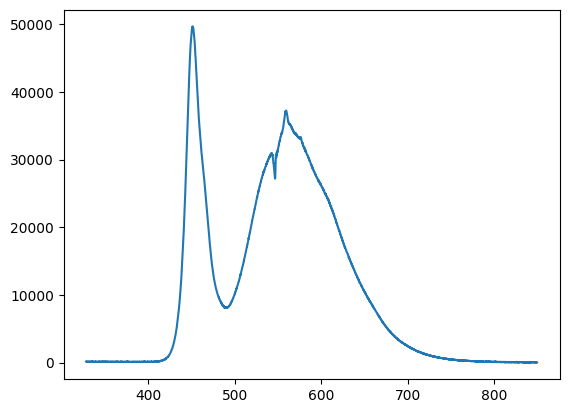
Fig. 4.17 Plotting a spectrum using
matplotlib.#To get the current spectrometer configuration, use the
GET_CONFIGURATIONcommand. This returns a dictionary or, in the case of multiple connected spectrometers, a list of dictionaries.{ 'n_average': 1, 'spectral_domain': 1, 'identifier': 'DS-InGaAs-256 #16052512', 'intensity_calibration': None, 'use_intensity_calibration': False, 'intensity_calibration_unit': '', 'use_nlir': False, 'use_nlir_crop': True, 'exposure_time': 100, 'x_timing': 3, 'manufacturer': 'StellarNet', 'is_active': True, 'use_stitching': False, 'switchover_wl': 0 }
To send data, we again define a helper function
 1async def send_data(writer, reader, command, payload):
 2    command = command + "\n"
 3    writer.write(command.encode())
 4
 5    payload = json.dumps(payload).encode('utf-8')
 6    header = struct.pack('>I', len(payload))
 7
 8    writer.write(header)
 9    writer.write(payload)
10    await writer.drain()
This functions accepts a
commandand apayloadin the form of a Python dictionary or list of dictionaries, encodes them into JSON, and transmits this as length-prefixed JSON data.We can use this function to configure the spectrometer
1await send_data(writer, reader, "SET_CONFIGURATION", {"n_average": 1, 'exposure_time':50})
Here, we set the exposure time (
exposure_time) to 50 ms and the number of spectra to average (n_average) to 1.Multiple spectrometers can be controlled using a list:
1await send_data(writer, reader, "SET_CONFIGURATION", [{"identifier": "DS-InGaAs-256 #16052512", "n_average": 1, 'exposure_time': 100, "is_active": True}])
The
identifierkey is required.This allows full programatic control over the spectrometer, e.g. in a loop:
 1exposureTimes = [5,10,25,50,100,250,500,1000]
 2
 3for t in exposureTimes:
 4    await send_data(writer, reader, "SET_CONFIGURATION", {'exposure_time':t})
 5    sp = await fetch_data(writer, reader, "ACQUIRE")
 6    plt.plot(sp['spectrum_x'], sp['spectrum_y'], label=f"Exposure: {t} ms")
 7    await asyncio.sleep(1)
 8
 9plt.legend()
10plt.show()
This snippet acquires spectra at different exposure times and plots them in a simple graph.
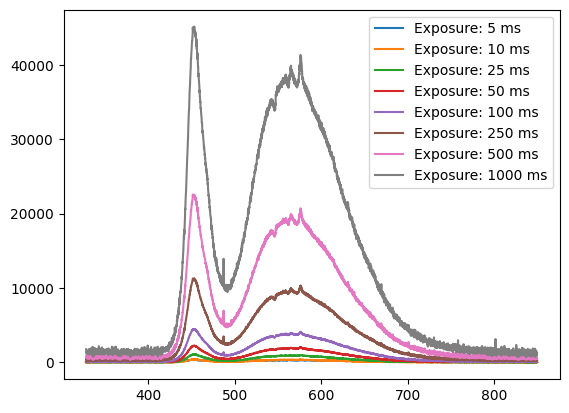
Fig. 4.18 Plotting spectra using
matplotlib.#When finished, it is good practice to close the connection
writer.close()